

Why do we request the receipt? How can you upload it?
Created: 2 years ago
What is receipt request and why is it necessary?
Receipt is a document that shows a payment has been made and the transaction has been successfully completed. You may come across to receipt request for the payments that you have made on ByNoGame.
A receipt is necessary for verifying whether a payment has been made and for resolving any issues with the transaction quickly if a problem arises. This process has an important role for the customer’s and our site’s security.
Why is it necessary?
Necessity of Transaction Approval: If there is a malfunction or error with the payments, a receipt is needed to verify whether a payment has been made. This becomes particularly important in the case of delays or errors during transfers.
Preventing the Misinformation: Receipt is necessary to prevent problems such as; wrong account number, short change or false transaction information. A receipt confirms that the payment has been completed correctly and transferred to the specified accounts.
Accelerate the Support Request: Having a receipt, speeds up the process of customer service’s investigation. With a receipt, customer service is able to check instantly.
Where and how can you obtain the receipt?
You can follow the steps below to obtain a receipt;
1) Mobile Banking: If you made the payment via bank transfer or EFT, you can download the receipt by logging into your bank's mobile app or online banking system.
After completing your transaction, go to the 'Transaction History' or 'Account Activity' menu.
Select the relevant transaction and use options such as 'Send Receipt' or 'Download Receipt' to save the receipt in PDF format.
2) Payment Providers (Such as Papara, etc.): If you are using digital wallet or payment providers, you can view and download your receipt via transaction history or account activities page.
3) ATM or Branch Bank: If you made a payment via ATM or branch bank, save the receipt that you have given. You can scan the receipt and upload it on our system.
Receipt upload steps
1) Log in to your ByNoGame account.
2) Click on Account > My Tickets.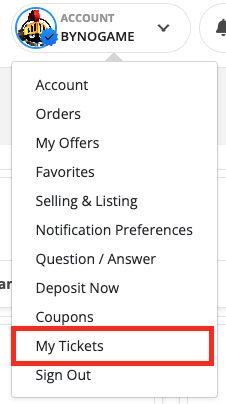
3) Click on Create a Ticket.
4) Choose Finance > Deposit. You can upload your receipt via “Upload File”, and you can also add a statement.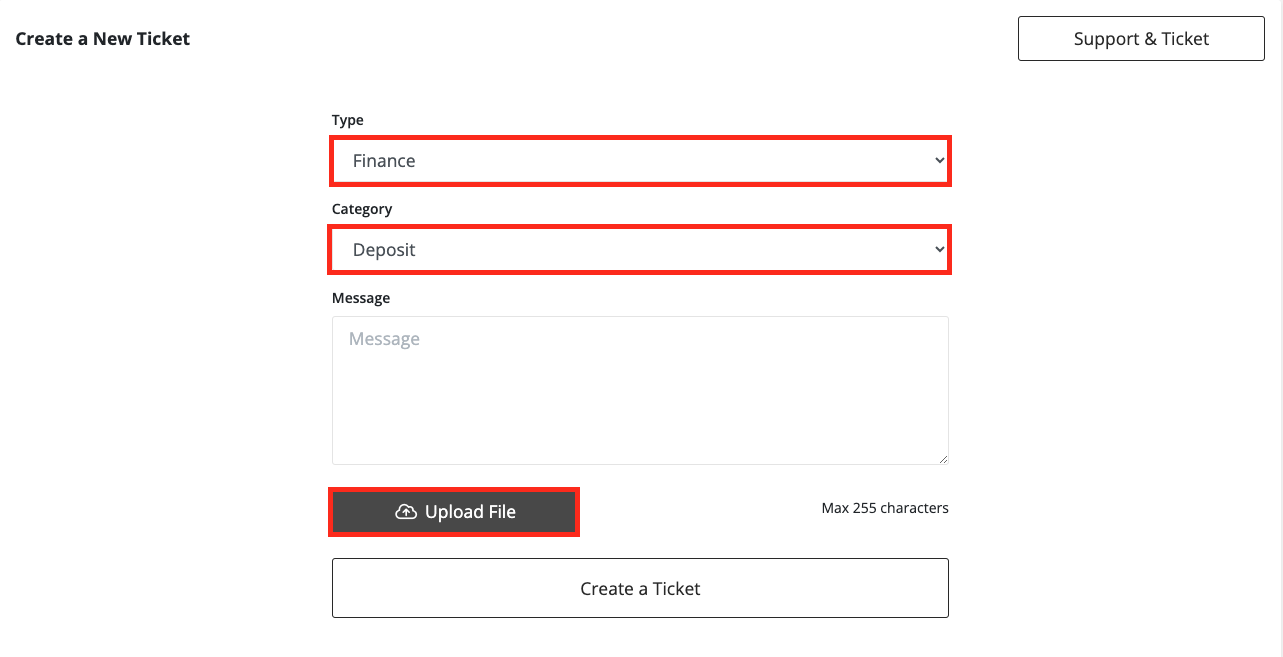
Your ticket will be solved by our related unit as soon as possible.
• You can track your ticket via Account > Support & Ticket > My Tickets.
A receipt is an important document as it serves as proof of payment. Requesting a receipt is done to ensure the security of transactions and to quickly resolve any potential issues.
Don’t forget to save your receipt and upload it to ByNoGame if necessary. 💸💸
Did this answer help you?
0 out of 0 people found this helpful