

How to check the ring?
Created: 6 months ago
Knight Online Ring check brief explanation for you.
⚠️ You can check the character's skill, stat, level, np, achieve, class, race and quest (70 Quest etc.) information without breaking the ring. For this, you need to right-click on the ring.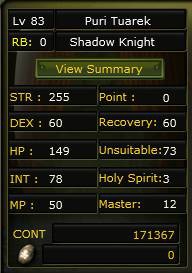
✅ You can check Level, Class, Gender, Race, Stat, Skill and NP information in the opened window.
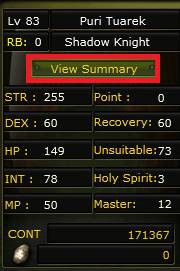
✅ To check achievements and quest information (70 Quest etc.), click the "View Summary" button in the opened window.
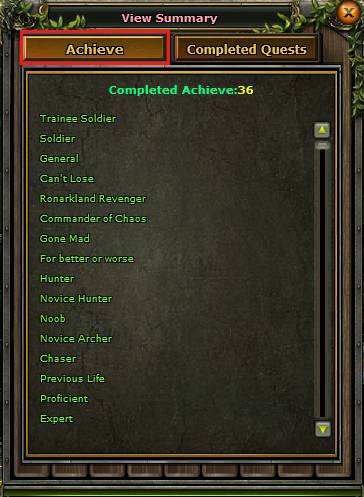
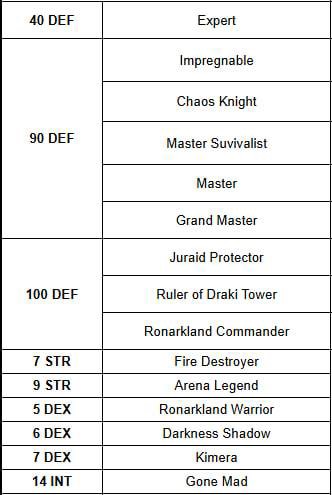
✅ To check achievements, you must click the "Achieve" button. You can see the achievement information you want to check from the opened window.
⚠️ For detailed information about achievements, you can check our article "Which are the most commonly used achievements?".
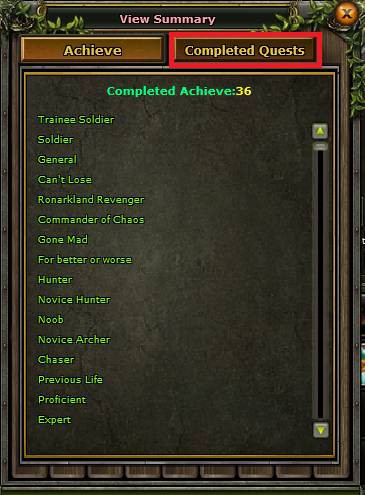
✅ For 70 Quest check, click the "Completed Quests" button on the View Summary screen.
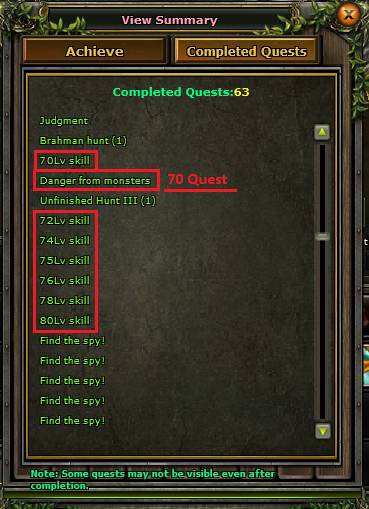
✅ In the opened section, you will see all the quests the character has completed. If the "Danger From Monsters" quest is not on this list, it means the character has NOT COMPLETED the 70 Quests.
✅ You can also view which skills are active for the character in this list.
❌ If there is an error in ring information, the buyer can request a refund or discount for the ring. If the error is noticed after the product is used, the ring fee can be charged from the seller or shared between buyer and seller, at the discretion of ByNoGame.
🛑 You have 15 minutes to check the ring after delivery. If you do not make a negative feedback via Live Support within 15 minutes, the delivery will be CONFIRMED.
⚠️📱 For transaction security, you must record a continuous video starting before breaking the ring (you can record a stable video with your phone camera fixed on the screen).
Did this answer help you?
0 out of 0 people found this helpful