

How to Order Gold Bar?
Created: 10 months ago
Ordering Gold Bar (GB) through ByNoGame is very easy.
-
Make sure you are ready at the delivery point and your trade feature is enabled.
-
Log into your ByNoGame account and click on Knight Online > Gold Bar section from the homepage.

-
Select the server you want to order from. You can order by quantity or the amount of TL in your account.
-
Remember: Only 10M and multiples can be ordered.
-
-
Determine the amount you want to buy and add it to your cart.

-
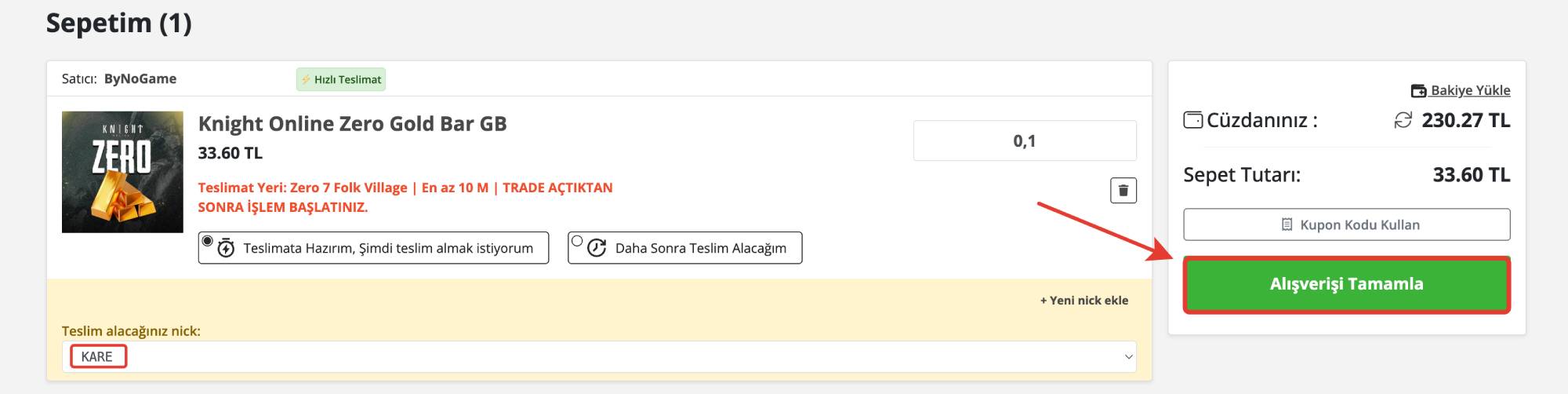
Check the products in your cart and select your character name.
-
If you haven't added before, use the “Add New Nick” button.
-
-
After selecting your character, click the “Complete Purchase” button.
-
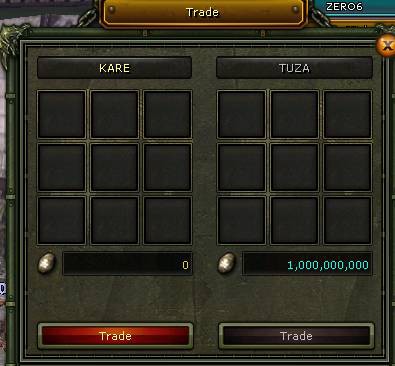
Return to the game screen, approve the incoming trade transaction, and receive your Gold Bars.
Ordering Gold Bar with ByNoGame is safe, fast, and easy. 🎮💸
Did this answer help you?
0 out of 0 people found this helpful