

How can I correctly find my Knight Online nick?
Created: 10 months ago
⚠️ “Your nick was incorrect or invalid, so your transaction was canceled or put on hold.”
In Knight Online nicks, letters and numbers like I, i, L, l, 0, O can look very similar. This can cause small confusions. For transaction security, the nick submitted must be exactly the same as your character’s in the game.
So, how can you correctly write your Knight Online nick?
• Log into Knight Online.
• On the bottom left, you can see the nicks of characters next to your own character in the game. Your own nick appears at the very bottom.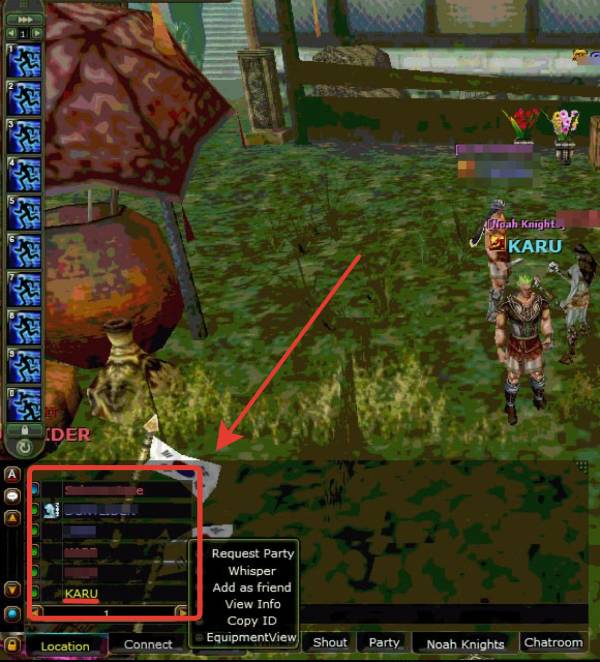
• You can right-click on your nick and select the "Copy ID" option. This action will copy your in-game nick.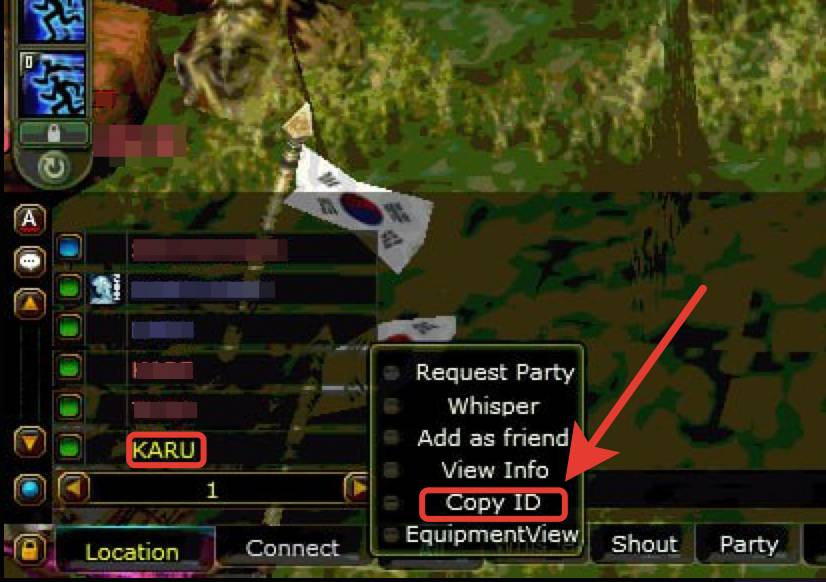
• In this way, uppercase-lowercase letters and similar characters will be copied exactly as they are. Afterwards, you can create a complete order flawlessly by using copy-paste. 😇
Did this answer help you?
0 out of 0 people found this helpful